From Chaos to Control: How One Network Engineer Mastered IPv4 Subnetting
The Problem: A Network on the Bringe
It was 2 AM on a Tuesday when the pager went off. Again. The corporate network at TechCorp Industries was down—again. As the senior network engineer, you'd seen this story play out too many times before. Users couldn't access applications, VoIP phones were dead silent, and the server team was breathing down your neck.The root cause?
A poorly designed IP addressing scheme that had grown organically over five years. Someone had thrown a /16 network at the problem, created VLANs on the fly, and now you had overlapping subnets, broadcast storms, and no clear documentation. The network had become a house of cards waiting to collapse. That night, staring at the rack in the dimly lit data center, you made a decision: tomorrow, you'd rebuild the entire IP addressing scheme from scratch. You'd master subnetting, design a proper enterprise network, and never face this chaos again. The Journey: Learning to Subnet the Right WayUnderstanding the Why
The first lesson wasn't about binary math or CIDR notation—it was about understanding why subnetting matters at all. In enterprise environments, proper IP address segmentation achieves three critical goals: Performance: Smaller subnets mean fewer devices sharing the same broadcast domain. Instead of 4,000 devices screaming into the void, you have manageable groups of 200-250. Broadcast traffic stays contained, and network performance improves dramatically.Security: When your servers, users, VoIP phones, and management systems all live in separate subnets, you can enforce granular access controls. A compromised workstation in the user VLAN can't directly reach your management network.
Manageability: Logical IP schemes make troubleshooting trivial. When you see 10.0.30.45, you immediately know it's a VoIP phone on VLAN 30. No more guessing, no more hunting through switch configs.
The Fundamentals: IPv4 and CIDR
Every IPv4 address is 32 bits long, written as four decimal numbers separated by dots (like 10.0.10.0). The subnet mask—or CIDR notation like /24—tells you how many of those bits belong to the network versus individual hosts.
The key concepts you need to internalize:
Network address: The first address in any subnet (e.g., 10.0.10.0/24). This identifies the subnet itself and can't be assigned to a device.Broadcast address: The last address (e.g., 10.0.10.255/24). Used for broadcasting to all devices in that subnet.
Usable hosts: Everything between network and broadcast addresses. For a /24, that's 254 devices (256 total minus 2 reserved).
CIDR notation: The slash number tells you how many bits are "network bits." /24 means 24 bits for network, 8 for hosts.
The Five-Step Method
You grabbed a whiteboard and started planning. Here's the method you developed—step by step.
Step 1: Define Requirements
Before touching any IP addresses, you mapped out what the business actually needed:
How many departments? (Users, Servers, VoIP, WiFi, Management, Data Center)
How many hosts per segment? (Current count plus 30% growth buffer)
Any special requirements? (DMZ for public services, dedicated management network)
You discovered the old network had 120 users, 40 servers, 80 VoIP phones, and 20 network devices. Adding 30% growth, you needed segments that could handle 160, 55, 105, and 30 devices respectively.
Step 2: Choose Your Address Space
For corporate networks, RFC 1918 private ranges are the standard:
Class A: 10.0.0.0/8 (16.7 million hosts) – ideal for large enterprises
Class B: 172.16.0.0/12 (1 million hosts) – medium organizations
Class C: 192.168.0.0/16 (65k hosts) – small to medium businesses
You chose 10.0.0.0/16 as your corporate base. It gave you enough room to grow and was easy to work with.
Step 3: Calculate Subnet Sizes
The formula is simple: usable hosts = 2^(32-CIDR) - 2
For your needs:
/24 = 254 usable hosts (perfect for users, servers, VoIP)
/25 = 126 hosts (smaller departments)
/26 = 62 hosts (branch offices)
/30 = 2 hosts (point-to-point WAN links)
Step 4: Design the Scheme
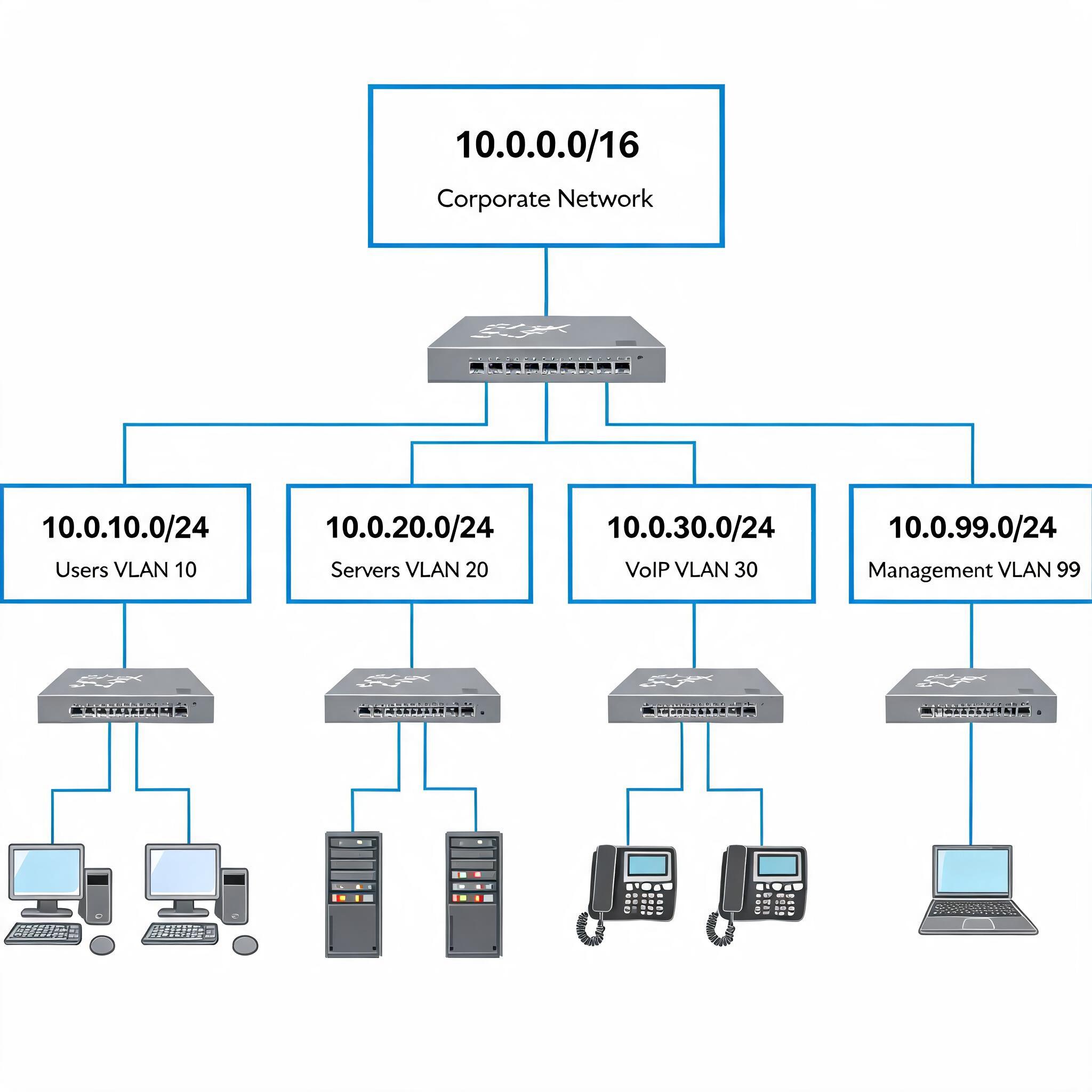
You allocated subnets logically, using the third octet to match VLAN IDs for easy identification:
This design gave you clear separation, room to grow, and a logical pattern that anyone could follow.
Step 5: Implement and Document
On your Cisco infrastructure, you configured SVIs (Switch Virtual Interfaces) for each VLAN:
interface Vlan10
 description Users_VLAN
 ip address 10.0.10.1 255.255.255.0
 ip helper-address 10.0.20.10
!
interface Vlan20
 description Servers_VLAN
 ip address 10.0.20.1 255.255.255.0
!
interface Vlan99
 description Management_VLAN
 ip address 10.0.99.1 255.255.255.0
 access-class 10 in
!
ip access-list standard 10
 permit 10.0.99.0 0.0.0.255
You documented everything in a central IPAM tool and created a simple spreadsheet backup. No more mystery subnets.
Visual representation of the redesigned corporate network with clear VLAN segmentation
Lessons Learned: Best Practices
Through this process, you discovered hard-won best practices that every network engineer should follow:
Keep it consistent: Use the same subnet sizes for similar functions across all sites. Reserve address blocks for future expansion. Follow a logical numbering scheme—your future self will thank you.
Security first: Isolate sensitive systems in dedicated subnets. Apply ACLs and firewall rules between VLANs.
Never mix user and server traffic in the same broadcast domain—it's a security nightmare waiting to happen.
Plan for growth: Always allocate 20-30% more addresses than you currently need. Use variable-length subnet masking (VLSM) to avoid waste. Reserve contiguous blocks for new sites or departments.
Document everything: Maintain up-to-date documentation in a central IPAM or wiki.
Use tools like Ansible or Python scripts to automate IP assignments. Integrate with DNS and DHCP for dynamic management.
The Mistakes You Swore Never to Repeat
You'd seen (and made) every mistake possible. Here are the ones that hurt the most:
Over-subnetting: Creating hundreds of tiny /28 subnets wastes addresses and makes routing tables explode.
Under-subnetting: One giant /16 for everything creates broadcast storms and zero security.
No documentation: "Mystery subnets" cause outages when the one person who understood them leaves.
Ignoring growth: Running out of addresses forces painful renumbering projects.
Inconsistent schemes: Different sites with different logic increases operational overhead and confusion.
The Resolution: A Network Transformed
Three months later, the network was unrecognizable. Broadcast traffic had dropped by 60%. Security incidents were down because compromised devices couldn't pivot across the network. Troubleshooting that used to take hours now took minutes—just look at the IP address and you knew exactly where a device belonged.
The best part? The pager stopped going off at 2 AM.
You'd taken a chaotic, organic mess and transformed it into a clean, logical, scalable architecture. The new subnetting scheme wasn't just technically correct—it was operationally excellent. Any engineer on the team could understand it, extend it, and troubleshoot it.
The Takeaway
Subnetting isn't just about binary math or memorizing CIDR tables. It's about designing networks that work for humans, not just machines. It's about thinking ahead, planning for growth, and creating systems that scale gracefully.
When you start your next network design, remember this: proper subnetting is the foundation of everything else. Get it right, and you'll save yourself countless late nights. Get it wrong, and you'll be living the same story you just read—except you'll be the one getting paged at 2 AM.
Start with a clear plan.
Document everything. Design for tomorrow, not just today. Your network—and your sleep schedule—will thank you.
This post was written by a network engineer who's been there, done that, and learned the hard way. If you're struggling with subnetting or enterprise network design, reach out—happy to share what I've learned.