Fine-Tuning Cisco ISE Downloadable ACLs: Order, Size and Safe Rollout
The 802.1X rollout went fine. Users authenticate, the RADIUS Live Logs are green, and the authorisation profile pushes a downloadable ACL to every access port. Then the tickets start: a printer driver that will not install, a laptop that loses its drive mappings after lunch, a developer who can reach a lab subnet nobody meant to expose. None of these are authentication problems. They are ACL problems, and the fix is not a bigger ACL but a better-tuned one.
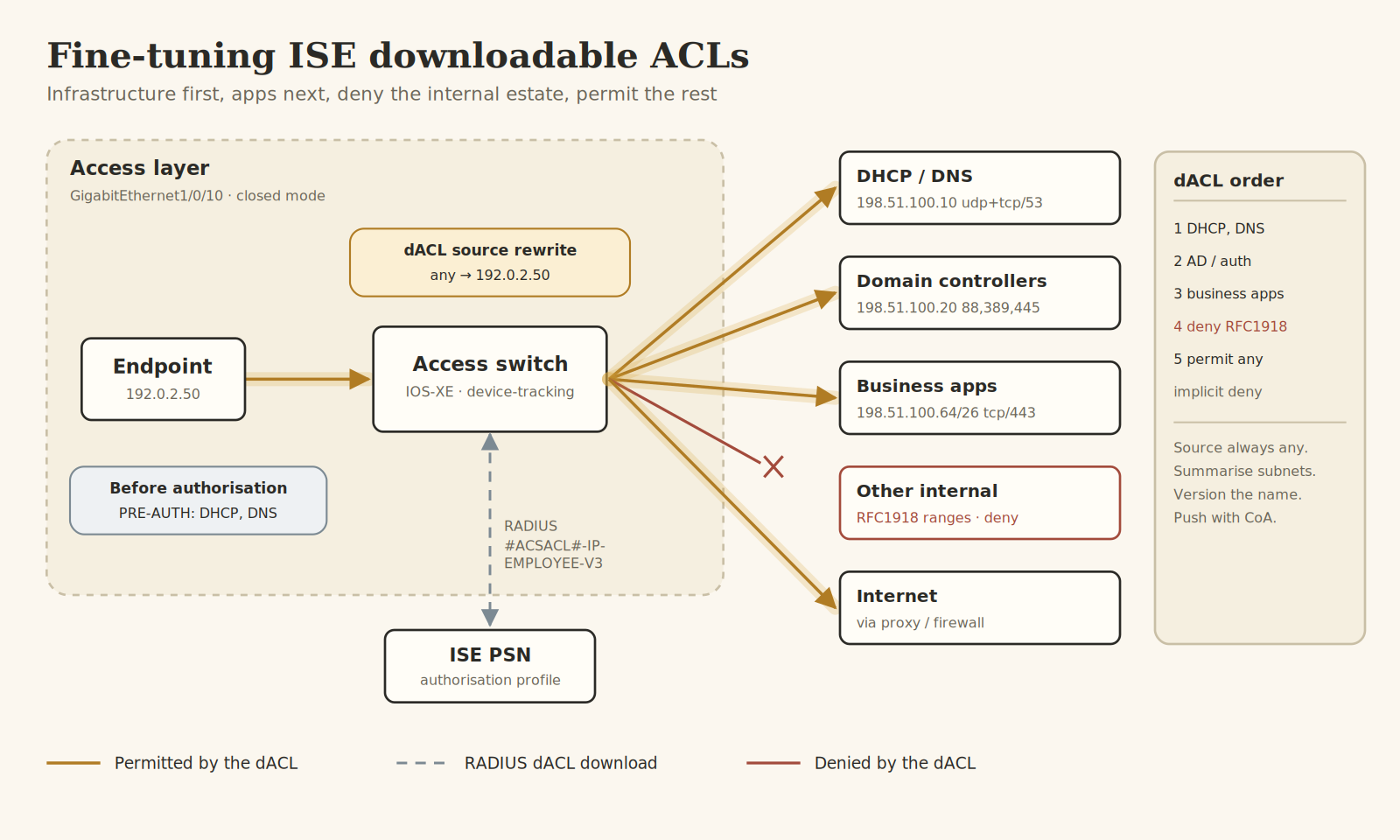
This article walks through how to fine-tune Cisco ISE downloadable ACLs (dACLs) so they enforce what you intended, stay small enough for the access layer to carry, and can be changed without a maintenance window. The topology at the top of this article shows the whole idea in one picture: an ordered dACL that permits infrastructure first, business applications next, denies the rest of the internal estate and lets everything else out.
How a dACL actually lands on the port
Before tuning anything, it helps to know what the switch does with the ACL ISE sends it, because most of the strange behaviour comes from here.
ISE sends a name, then the content
When an authorisation rule matches, ISE does not put the ACL text into the first Access-Accept. It sends a reference such as #ACSACL#-IP-EMPLOYEE-V3-65f2a1c0, where the suffix is a hash of the ACL content. If the switch has not seen that name and hash before, it opens a second RADIUS exchange to download the ACEs. In the ISE Live Logs this shows up as a separate entry with the dACL name in the username column. If the switch already holds that exact version, it reuses it and skips the download.
Source any becomes the host
You write every ACE in an ISE dACL with source any. On IOS-XE the switch substitutes the source with the IP address it has learned for that session, so permit tcp any host 198.51.100.20 eq 445 effectively becomes a rule for 192.0.2.50 only. This is why the switch must know the host IP, which on current IOS-XE means device-tracking (SISF) attached to the access ports.
The dACL sits on top of the port ACL
In low-impact mode the interface keeps a static pre-authentication ACL that allows only DHCP, DNS and perhaps PXE. Once the session is authorised, the dACL takes precedence for that host's traffic. In closed mode there is no port ACL, so the dACL is the only thing between the endpoint and the network after authorisation.
Every dACL ends in an implicit deny
Like any Cisco ACL, a dACL ends with an invisible deny ip any any. Anything you forget to permit is dropped silently, and the user experiences it as an application that hangs rather than an error message.
The switch side has to be ready
A perfectly tuned dACL does nothing if the switch is not set up to request and apply it. Three things matter: network authorisation pointing at ISE, device-tracking so source substitution works, and the pre-auth ACL on the port.
aaa authorization network default group ISE-GROUPdevice-tracking policy IPDT-ACCESStracking enableinterface GigabitEthernet1/0/10device-tracking attach-policy IPDT-ACCESSip access-group PRE-AUTH inaccess-session port-control autodot1x pae authenticatormab
If the authorisation line is missing, the switch accepts the session and simply never downloads the ACL. If device-tracking is missing, the session can sit with no IP bound to it and the dACL will not enforce the way you expect. Check both before you blame the ACL content.
Ordering the ACEs
Order is the whole game. The switch evaluates top down and stops at the first match, so the structure that works in production follows the same five layers every time, matching the order box in the diagram.
Infrastructure first
DHCP and DNS go at the very top. Without them nothing else works, and they are the services most often broken by an overeager deny. Include TCP for DNS as well as UDP: large responses and DNSSEC fall back to TCP, and the failure looks like random name resolution trouble rather than a blocked port.
Authentication and directory services second
Domain controllers need Kerberos, LDAP and SMB at minimum, and Group Policy processing will fail quietly without them. If you run posture or guest flows, the ISE PSNs on their portal port belong in this layer too.
Business applications third
This is the layer that differs between roles and the one you will tune most. Keep it to summarised destinations and the ports actually in use.
Deny the rest of the internal estate
A deny for the RFC1918 ranges stops lateral movement towards anything you did not explicitly allow above, such as server VLANs, management networks and other user segments.
Permit the rest
The final permit lets internet-bound traffic through to the proxy or firewall, which is the right place to apply web policy. Keeping that policy off the access switch keeps the dACL short.
Here is the resulting dACL as it sits in ISE under Policy Elements, Results, Authorization, Downloadable ACLs:
permit udp any eq bootpc any eq bootpspermit udp any host 198.51.100.10 eq domainpermit tcp any host 198.51.100.10 eq domainpermit udp any host 198.51.100.20 eq 88permit tcp any host 198.51.100.20 eq 88permit tcp any host 198.51.100.20 eq 389permit tcp any host 198.51.100.20 eq 445permit tcp any 198.51.100.64 0.0.0.63 eq 443deny ip any 10.0.0.0 0.255.255.255deny ip any 172.16.0.0 0.15.255.255deny ip any 192.168.0.0 0.0.255.255permit ip any any
Use the syntax check button in the dACL editor before saving. It catches typos, but it will not catch an ACE in the wrong position, so read the order once more yourself.
Keeping the dACL small
Every authorised session programs its own copy of the dACL into hardware. A 48-port access switch with a phone and a PC on each port can carry close to a hundred sessions, and a long dACL multiplied by that number is how you run out of TCAM on a Friday afternoon.
Summarise destinations
If three application servers sit in the same /26, write one ACE for the /26 rather than three host entries. The security cost is usually negligible compared with the hardware cost.
Push policy to where it belongs
The access-layer dACL should answer one question: which internal segments may this role reach? Fine-grained application filtering belongs on the firewall, and URL filtering belongs on the proxy. Trying to make the dACL do both is how it grows to eighty lines.
Do not use one dACL per user group variation
It is tempting to clone a dACL for every small exception. Instead, keep a handful of role dACLs and handle exceptions with a separate authorisation rule. Fewer distinct dACLs also means fewer downloads and a cleaner cache on the switch.
A tuning workflow that does not break production
Tuning is iterative, and the safe way to iterate is to change the policy for a small group, watch it, then widen it.
Discover before you restrict
Run Flexible NetFlow on a sample of access ports, or use the flow data your firewall already has, for one to two weeks. The output is the real list of destinations each role talks to, which is almost always longer than the one the application owners give you.
Version the name
Name dACLs with a version suffix, such as EMPLOYEE-V3. A new name makes the change visible in Live Logs and on the switch, and rolling back is just a matter of pointing the authorisation profile back to the previous version.
Pilot with a scoped rule
Create a new authorisation rule above the production one, matched on an identity group or a single site's network device group, that uses the new dACL. Only the pilot users get the change.
Push the change with CoA
Editing a dACL does not alter sessions that are already up. They keep the old version until they reauthenticate. Trigger a Change of Authorization reauthentication from the session in Live Sessions, or wait for the reauthentication timer if you prefer a gentler rollout.
Verifying on the switch
Verification should show three things: the session is authorised, the expected dACL is attached, and its content matches the version you saved.
show access-session interface GigabitEthernet1/0/10 detailsshow ip access-lists xACSACLx-IP-EMPLOYEE-V3-65f2a1c0show device-tracking database interface GigabitEthernet1/0/10
In the session details, look for the ACS ACL line with the name and hash you expect, and an IPv4 address bound to the session. The second command prints the ACEs as the switch holds them. Where your platform exposes per-ACE match counters, they are the quickest way to see which deny is catching the traffic behind a ticket. The device-tracking output confirms the IP binding that makes source substitution work.
On the ISE side, open the Live Log detail for the session and confirm the dACL download step succeeded. A failed download usually means a syntax problem that slipped through or a shared-secret issue on the second exchange.
Mistakes that bite in production
The ACE names a source address
Writing a specific source in a dACL ACE defeats source substitution and can produce rules that never match. Always use source any and let the switch fill it in.
DNS is permitted for UDP only
Most lookups work, a few fail, and the pattern looks random. Add the TCP entry for the resolvers.
IPv6 walks past an IPv4-only dACL
If your endpoints have IPv6 and the dACL is IPv4 only, the IPv6 traffic is not covered by your intended policy. ISE supports IPv6 and dual-stack dACLs, so either define the IPv6 rules or explicitly deny IPv6 until you are ready.
The change was saved but nobody got it
Existing sessions keep the old dACL. If the pilot users report no difference, check the hash on the switch before you start debugging the ACEs.
The deny sits above the permit it was meant to follow
A broad deny placed before an application permit silently overrides it. When a single app fails after a change, check the order before the content.
What changes on Juniper
Juniper EX switches handle this differently. Instead of downloading ACL text, ISE usually returns a Filter-Id that names a firewall filter already configured on the switch, or uses Juniper-specific attributes to apply filter terms. That means the content lives on the switch rather than in ISE, so a change is a configuration push to every switch rather than an edit in one place. If you run a mixed estate, keep the role names identical on both sides so one ISE authorisation profile maps cleanly to both vendors.
The takeaway
A good dACL is short, ordered and versioned. Permit infrastructure and directory services first, then the applications each role needs, deny the rest of the internal address space, and let the firewall handle everything beyond that. Write every ACE with source any, make sure device-tracking is in place, and remember that edits only reach a session through reauthentication.
For a lab exercise, take one switch port and one test user. Build an EMPLOYEE-V1 dACL with the layered order above, authorise the user, and verify the ACS ACL line in the session details. Then remove the TCP DNS entry, save it as EMPLOYEE-V2, send a CoA reauth and watch what changes on the switch and in Live Logs. Ten minutes of that teaches more about dACL behaviour than any amount of reading.